
What are distribution lists?
Overview:
A distribution list is a grouping of Creovai users. In call comments you can easily reference the distribution list to notify a group of users about key call events.
For example, in a call comment you'd begin typing "@" and the beginning of the distribution name to address your comment to that group.
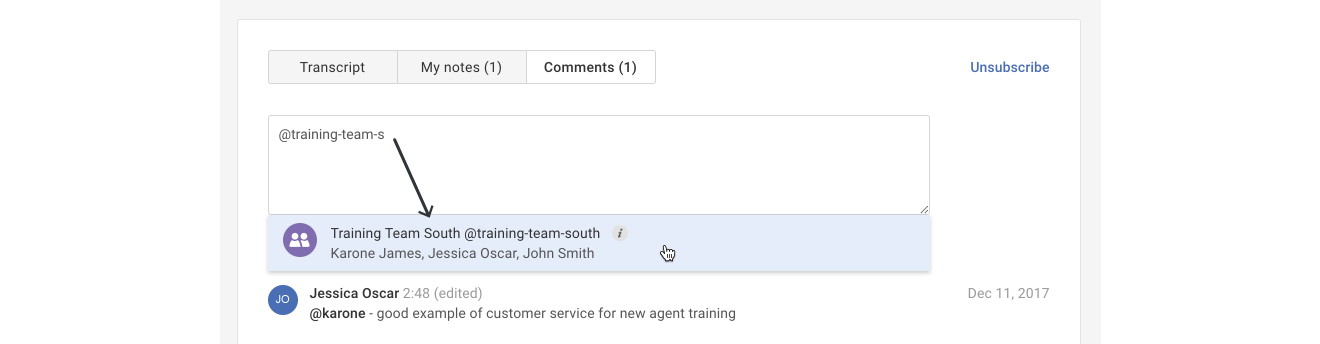
Tip: Distribution lists are public and can be used or modified by any Creovai user.
Distribution lists make it easy to:
- Set up groups of Creovai users into a shared distribution list (i.e. training‑team, team‑supervisors, etc.).
- Quickly notify groups of key call events in your comments.
- Easily manage your organization's distribution lists in one place.
Elements of distribution lists:
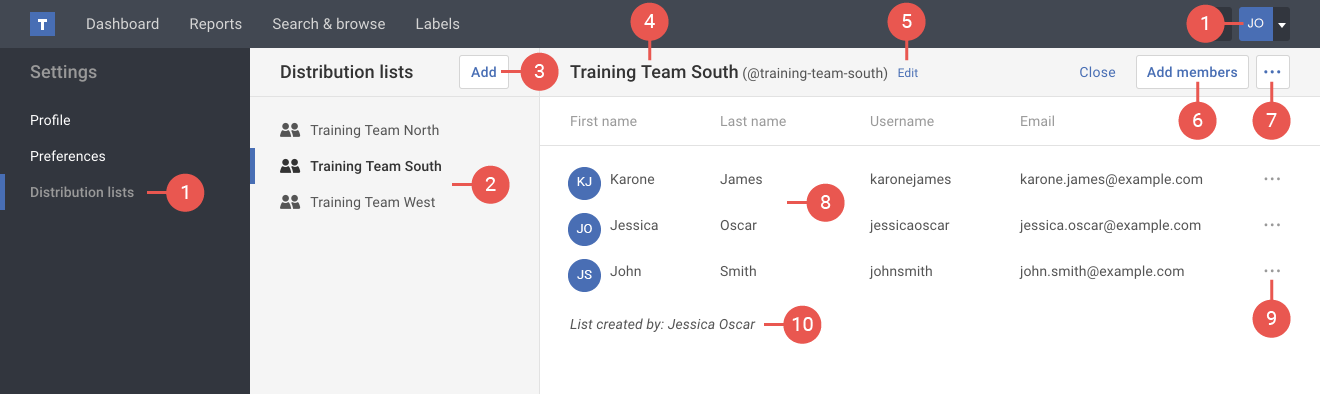
- Distribution lists link: takes you to your distribution lists. This link is found under Settings in your user drop-down menu.
- Distribution lists: displays all the distribution lists in your organization. Click a distribution list to display the list details on the right.
- Add button: allows you to add a new distribution list.
- List name: displays the distribution list name along with the @ tag you'd use in call comments.
- Edit link: allows you to rename the distribution list shown.
- Add members button: allows you to add members to the distribution list.
- List actions ( ••• ) button: offers additional actions to either copy or delete the distribution list.
- Members list: displays the members added to this distribution list.
- Members actions ( ••• ) button: allows you to remove a member from the distribution list.
- List creator: displays who created this distribution list.